Fills the gaps
If a command is missing a detail, Dirac asks for it. If a name is ambiguous, you pick from clickable options.
Massive Dynamic · Dirac AI
Dirac builds layouts, plans, answers and explains, using the live project model and the product manuals. Every decision that has to be correct stays in deterministic code that Dirac can call but never overrule.
One click
Each is a button in the Dirac panel's command library: a realistic starting point built from the equipment library with real connections. A second click tidies the canvas.
Build 20 MW 2N data centerDual-feed redundant layout with auto-sized rooms, generators, UPS, PDUs and racks.
Build N+1 data centerActive and spare redundancy: one spare generator and one spare UPS.
Build pharma GMP layoutCleanrooms, HVAC, WFI loop, bioreactors, CIP, EMS and BAS in one project.
Build WFI system · cleanroom suite · sterile trainOne GMP system at a time, for a project per room.
Build project execution planThe PEP organisation chart, with redundancy pairs at every tier.
Plan this with meA guided interview for planners without equipment vocabulary. Dirac draws the plan.
Rearrange to make it look niceReorganises the canvas into a readable layout without changing a single connection.
In the app
Every command below is a button. Dirac shows what it will do and waits for your confirmation before changing anything.
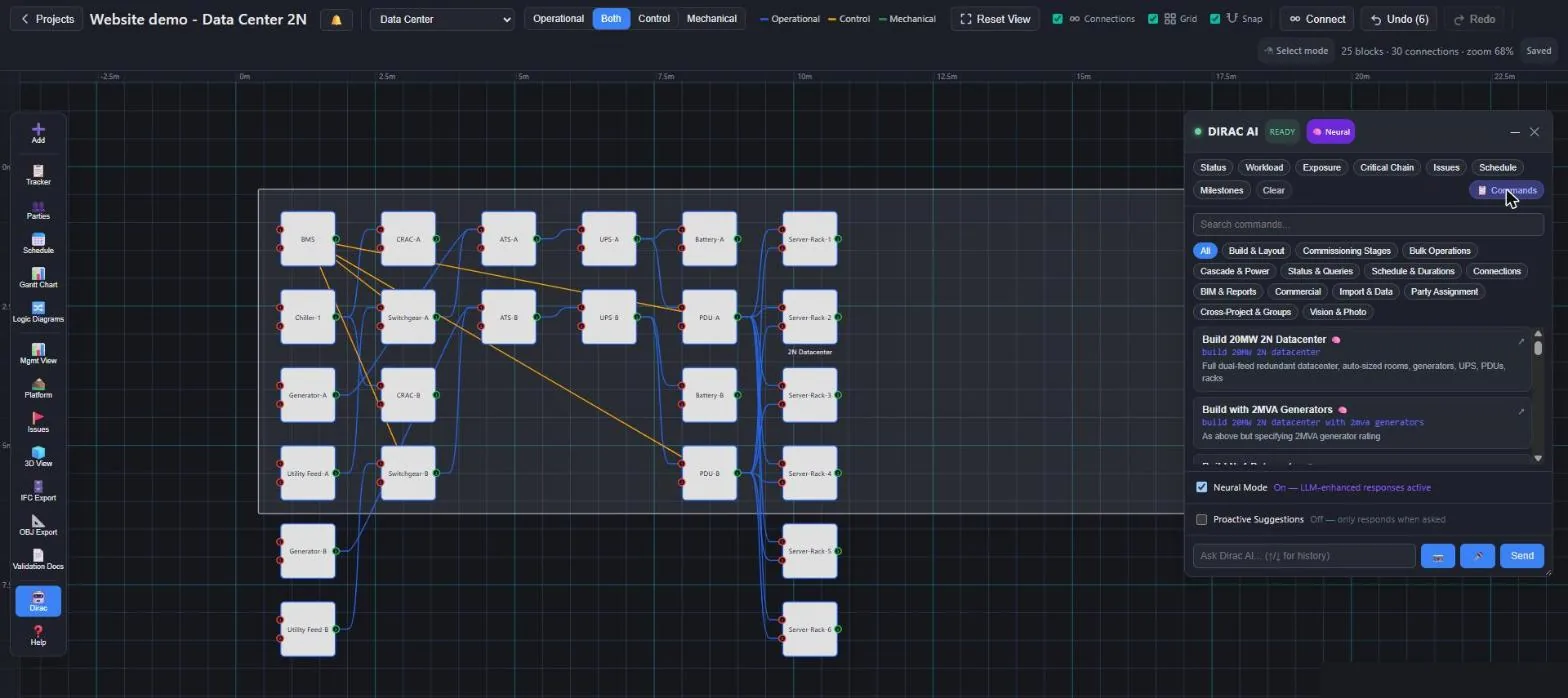
Capabilities
Every command is a button in the Dirac panel, and most can also be typed in plain words.
Data center, GMP and hospital layouts, PEP org chart, guided planning, rooms, assets, auto-rearrange.
Whole-site and energisation schedules, pharma schedules, capacity windows, parallel limits, target-date risk.
What next, blockers, dependencies, exposure, handover readiness, decision history, the manuals.
Energise an asset or a whole site from its sources, trace mains and control paths, find power issues, simulate the loss of a source with transfer timers and generator start.
Standby feeds and ring open points, switch an asset to another source, open or close one feed, trips and 86 lockouts, fail to open and fail to close, breaker failure, the paralleling check, the Switching Playbook, a hold on a generator set, and return to normal after a transfer.
Stage progress across assets, availability, mains and control states, shared-checklist selection.
Excel import and export, BIM mapping and reports, COBie, connections, parties, commercial summary, cross-project scenarios, photo description.
Scenario testing
Dirac runs loss-of-source scenarios on the clock from the same model: which breaker transfers and when, whether the ring heals from its far end, how many generator sets start, and how the plant comes back to normal. The rules it applies are written down in one place, the Switching Playbook, and each one is a site setting.
Generators start only when every board the generator bus serves has lost its supply and none of them has another way back. A one-board problem is left to the other board and to the ring self-healing.
A breaker locked out by an 86 is not something the operator could simply close, so it is no alternative that keeps the generators off.
A breaker that fails to open blocks only the paths through its own device; the RMU rings still heal from their other side, on the ring's own timer.
"hold start of GEN-1" keeps a set out of every automatic start until it is released: the way to test what the plant does when the generators are not allowed to come.
Every rule is on by default, because the defaults are what the official sequences of operation of a 2N data center require. Switch one off for a site whose scheme differs; the project remembers it and the exported simulator shows it in its header.
Beyond commands
If a command is missing a detail, Dirac asks for it. If a name is ambiguous, you pick from clickable options.
Compound requests are split into their steps and each one is shown for confirmation.
Proactive checks point out risk, such as what a change does to exposure or the critical chain.
Every asset keeps a versioned record of why it is configured the way it is, queryable months later.
Schedule corrections are learned per equipment type and stage and used in the next plan.
Boundary connections let Dirac simulate what a failure in one building does to another.
Ask
What next?The items that can be tested now, given what is signed off.
Find blockersWhat stands between an asset and its next stage.
Explain circular dependenciesThe smallest loop, and the temporary source that breaks it.
Simulate loss of a sourceWhich feeds transfer and in what order, what comes back when, and how many generator sets must start — always one spare, never while a board still has another way back.
Show playbookThe Switching Playbook as it stands: Cerberus, Prometheus, Theseus and the sets Hades holds.
Ready for handover?A verdict and the list behind it.
Why is this configured this way?The recorded decision history of that asset.
Ask the manualsHow-to answers retrieved from the manuals, with citations.
Design
Exact commands are matched first, then keyword and on-device semantic matching. Only open questions go to a language model, and those tiers are optional.
Sign-off validity, gate safety and schedule sequencing are deterministic. Dirac explains them and never decides them.
Every command that changes the project is shown first and runs only after you confirm it in the interface.
Each AI tier can be switched on or off per project. Photos are described by a privately hosted model, never an outside vision service.
Dirac can look at a site or issue photo and describe what it sees, including possible defects. It is still being trained, so every description is marked unverified until a person confirms or corrects it, and each correction teaches it.
Corrections and ratings improve Dirac. Patterns are reviewed before they apply to every user.
Dirac's commands and one-click layouts work without any language model. The general language-model tiers and Dirac's own model, trained on commissioning language and logic, can each be switched on or off per project.
Open the app and build a layout for your type of facility with one click in the Dirac panel.