Redundancy-aware
N+1 and 2N designs need one ready feed, not every feed (OR). A genuine single path still needs its one feed (AND). Both layers, both rules.
Massive Dynamic · Scheduler
Most commissioning schedules are typed by hand and drift from the design in weeks. The Massive Dynamic scheduler computes the whole sequence from the plant model itself: what feeds what, what is signed off, and what capacity you have.
How it works
Asset types, connections on every layer, and the stage each asset has reached.
Every dependency comes from how the plant is connected. Predecessors are shown, never hand-edited.
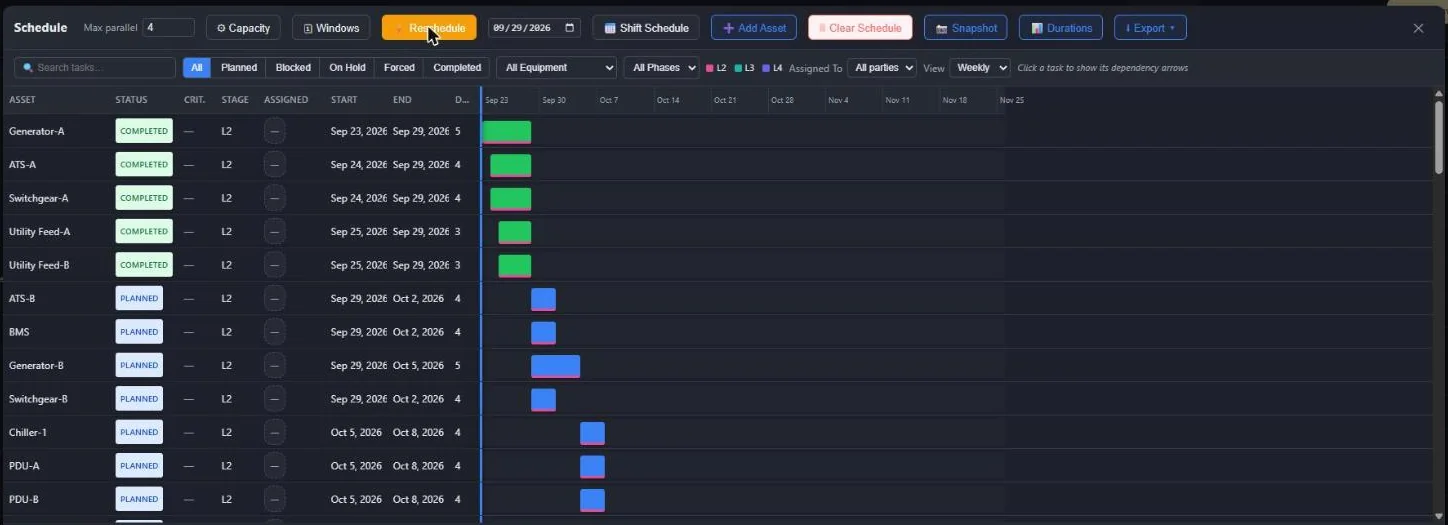
Tasks start when their feeds are ready and capacity allows, until every stage is placed.
Reschedule freezes a snapshot. Later changes show as drift until you choose to reschedule.
In the app
Engineering rules
N+1 and 2N designs need one ready feed, not every feed (OR). A genuine single path still needs its one feed (AND). Both layers, both rules.
Where an asset has real control inputs, whatever feeds its control power is scheduled ahead of its mains feed, as on a real relay panel.
Heaters and cabinet lighting wired on the control layer still have to be done, but never masquerade as DC control power.
A bay, a T-off or a redundant pair can share one task at any stage, such as a Joint L3 or a Joint Final Test, completing when every member signs off.
Defaults for 110 equipment types, per-asset overrides and size multipliers. Corrections you import are learned per equipment type and stage.
A global parallel-task cap, stricter caps per equipment type, and date or phase windows, including zero-capacity blackouts.
Risk
A redundancy-aware check finds loops no rescheduling can clear. Dirac names the loop asset by asset and can place a temporary generator to break it, after you confirm.
When an asset runs past its target date, the verdict separates “not achievable: the critical path is already too long” from “achievable but late: a capacity or ordering issue”.
Any asset whose power path ends at equipment not yet on site is flagged at once, and the same source becomes a critical gate in Management View.
Snapshot a plan and compare it with ghost bars. Drag a bar to pin an earliest start; nothing else moves until you reschedule.
Share
The schedule exports to XLSX, CSV, SVG and JSON, and as a single self-contained HTML animation that anyone can open in a browser, without a login or a licence, to watch the plant come online day by day.
The same timeline drives 3D and VR playback, so a walkdown can show the plant as planned for any date.
Schedule one asset's energisation with its real dependency chain, with or without safety-linked and backup sources.
Site-wide or single-asset schedules in DQ, IQ, OQ and PQ terms.
Milestones sit on the computed plan with live requirement progress and blockers; Dirac suggests them from the schedule, and the Gantt shows the planned dates after every Reschedule.
A click away
Schedule the entire siteA full sequence from the current model, in one command.
Schedule energisation of XFMR POnly that asset's real dependency chain.
Explain the circular dependenciesThe loop, named asset by asset.
Place a temp generator to break this cyclePlaced after your confirmation, flagged as temporary.
Explain the target date riskNot achievable, or achievable but late, and why.
Set parallel tasks to 4Capacity changed in one line.
Send us a single-line or an equipment list. We will show the schedule Massive Dynamic derives from it.